Remote config with zero setup: hand this repo to your AI
An example project with a skill: your AI installs it, explains it and changes the flags for you. What you get and how to use it.
Written by@Efrain_Jz
In the previous post we covered what feature flags and remote config are. This time you don't install or configure anything by hand: there's a ready-made project and a skill that tells your AI how to set it up and use it. You give it the link, and the AI does the rest.
What you get
- Change your app without shipping it again. A piece of text, a number or a new feature turns on and off by changing a value.
- Turn off something broken in seconds. If a new feature misbehaves, set its flag to
falseand it disappears. - A typo doesn't break the app. If someone types "twenty" where a number goes, the app uses the default and logs a warning.
- Everything runs on your computer. No accounts to create, no service to pay for.
How it works
Each flag is a name and a value: { key, value }. The value is always stored as text, and the app recognizes whether it's a yes/no, a number or text.
Try it: flip the flags and watch the store change. Under each one you can see how it's saved and what the app recognizes.
Nothing was shipped again: the app just read the values again.
That way a single table covers everything, and the app knows what to do with each value: a yes/no shows or hides something, a number decides how many products to list, and text fills a banner. If a value is mistyped, the app uses the default and keeps working.
How to use it
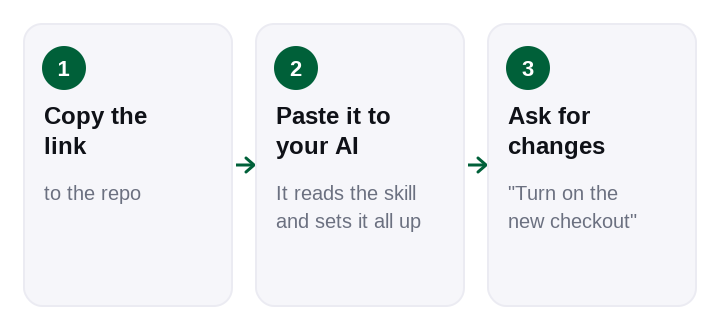
1. Copy the repo link: github.com/efrain26/remote-config-example
2. Paste it to your AI with a message like this:
Clone this repo:
https://github.com/efrain26/remote-config-example
Use its skill to get it
running on my computer.
The AI checks you have what's needed, installs the project, creates the database, runs the tests and gives you the link to open it in your browser. If something fails, the skill tells it how to fix it.
3. Ask for changes in plain words:
- "Turn on the new checkout."
- "Change the banner to 'Back on Monday'."
- "Show 10 products."
- "Add a new flag for a maintenance notice."
- "Explain how the app knows if a value is a number or text."
Reload the page and the change is there, with no restart.
A skill ready to learn from
The repo comes with a skill: a file with everything your AI needs to teach you remote config. What it is, how it's built in a real project and what your computer needs to run it.
Your AI reads it and walks you through it at your pace, with the project running in front of you. Ask about anything you don't get and try it right there. Claude Code uses it on its own; with another tool, ask it to read .claude/skills/remote-config-local/SKILL.md first.
You don't need to know the commands: hand the repo to your AI and ask for what you want to change.